# Let's Talk Structure & Style
# Review Folder Structure
# Basic folder structure and hierarchy for course repo.
Let's open the repo and consider some organization. I will commit work to my instructor class repo so you can refer back to it later
WARNING
Git tracks more than the changes to your content in your code files. It's tracking everything inside your repository including changes to folder structure, naming, additions, deletions, etc.
# HTML Review
Your main resource for HTML documentation on elements should be Mozilla's documentation.
Live Coding Activity!
Let's add HTML to Andrew's fake course site together. I'll take suggestions from the class.
# Key Takeaways
Remember to always have your Developer Tools open while you code
- In Chrome:
View>Developer>Developer Tools
- In Chrome:
Basic HTML scaffolding:
<!DOCTYPE html>
<html lang="en">
  <head>
    <meta charset="UTF-8" />
    <meta name="viewport" content="width=device-width, initial-scale=1.0" />
    <title>My Title</title>
    <!-- your stylesheet links go here -->
  </head>
  <body>
    <!-- visible content goes here -->
  </body>
</html>
- Remember proper indentation: you may use a code formatter like Prettier
- You can even add
formatOnSaveto auto format every time you save you changes
- You can even add
- Remember proper semantic tags like
nav,section,main,header,footerand type hierarchy. Don't settle for adivwhen there's a better tag out there.
Let's take a break? 😅
# CSS [Cascading Style Sheets]
# 3 ways to add CSS to your document.
- Inline
- Directly inside the
headof your html document - External Stylesheet 👏
<head>
  ...
  <!-- external stylesheet links go here -->
  <link rel="stylesheet" href="style.css" />

  <!-- You can write styles that apply to the entire document
  directly in the head in a style tag -->
  <style>
    body {
      padding: 0;
      margin: 0;
      color: #333;
    }
  </style>
</head>
<body>
  <!-- inline styles are added directly to HTML tag with a style attribute -->
  <main style="background-color: blue"></main>
</body>
...
# Targetting CSS
- Selectors:
tags,.classes,#ids property:valuepair syntax
/* selecting a tag */
h3 {
  font-size: 30px; /* notice the property:value syntax */
  color: blue;
}

/* selecting a class */
.project-block {
  border: 1px dashed #333;
  padding: 5px;
  margin: 10px 5px 10px 5px;
}

/* selecting an ID */
#container {
  width: 90%;
  margin: 0 auto;
  font-family: 'Retina', 'Helvetica', sans-serif;
}
This is a reference for every css property you can use
# Everything in CSS is a box.
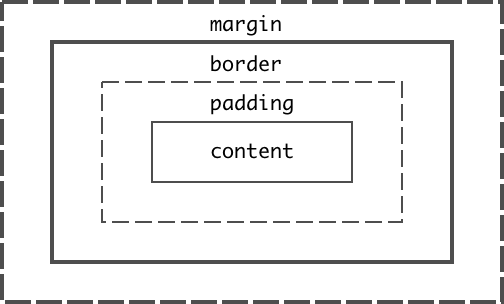
Live Coding Activity!
Let's add CSS to Andrew's fake course site together.
Get started on the homework